
Reconnect Garmin Watch1.122 - Google Play
You'll be able to see results in few seconds.
Publisher Description
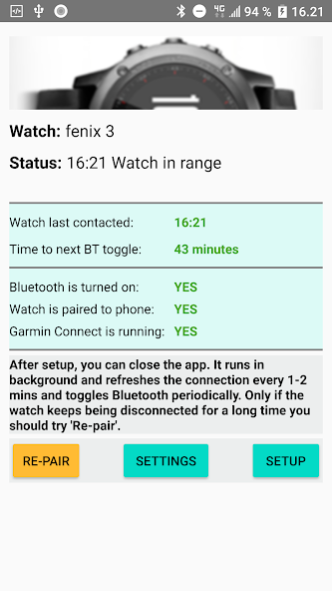

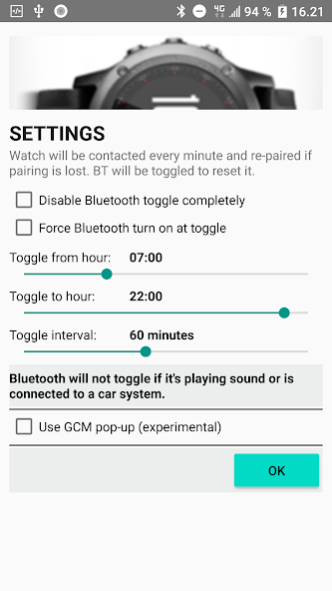
Reconnect Garmin Watch keeps the connection to your watch and reconnects the watch after being away from phone. It runs in the background and battery usage is very low.
The app requires Garmin Connect installed. NOTE: I am NOT from Garmin.
The app works for Fenix 3/5, Forerunner 235/735XT/920, vivoactive3, vivoactive HR, vivosmart HR, vivomove HR, and other models.
When you run the app the first time, it will start Setup. Please follow the instructions exactly. You should also turn off battery optimisation for the Garmin Connect app.
Huawei phones: Please see text at the bottom.
Troubleshooting:
>> On Galaxy phones, you may have to reboot the phone and force stop the "Bluetooth share" app (go to phone Settings - Applications, show system apps - Bluetooth share - Force Stop).
>> When Vivoactive HR disconnects, sometimes you have to go into Garmin Connect menu - Garmin Devices, and then turn off Bluetooth on the phone. Connect should prompt you to turn on Bluetooth again; do it and wait 10-20 sec, and then the watch should reconnect. (You should also have Location Services turned on in Android settings!)
>> Some Lenovo phones may only work if the watch BLE-ANT firmware is downgraded. You need to Google a file called something like GUP1909.BIN and upload it to the watch from a computer.
>> If the watch shows it's CONNECTED but you don't get any notifications:
* Open Garmin Connect and select Settings - Smart Notifications. Disable and enable one of the notifications, like Incoming Calls. This could make Connect ask for permissions.
* If it keeps asking for permissions even though you gave permission then restart the phone.
-- If it doesn't ask for permissions:
* Go to your phone's Settings - Apps - Connect - Permissions and enable all permissions
Issues with Garmin Connect on some Huawei phones:
You can try the following.
* Turn off Location Services on your phone and then try to add the watch in Garmin Connect
- OR -
* Install and run the app "Bluetooth pair"
- OR -
* Solution from fin:
https://forums.garmin.com/forum/on-the-trail/wrist-worn/fenix-3/1271446-unable-to-pair-fenix-3-with-android-7-0-phone
If you are missing notifications from Huawei phone then check app permissions for Garmin Connect:
Settings > Apps & notifications > Apps > settings (small gear sign on the bottom ) > special access > notification access: Make sure Garmin connect smart notifications is turned on.
Latest status from Garmin on this issue:
https://support.garmin.com/en-US/?faq=3qBFoCgeH428IUUfc0SpZ7&searchType=noProduct
About Reconnect Garmin Watch
The company that develops Reconnect Garmin Watch is Martin Birk. The latest version released by its developer is 1.122.
To install Reconnect Garmin Watch on your Android device, just click the green Continue To App button above to start the installation process. The app is listed on our website since 2020-02-09 and was downloaded 0 times. We have already checked if the download link is safe, however for your own protection we recommend that you scan the downloaded app with your antivirus. Your antivirus may detect the Reconnect Garmin Watch as malware as malware if the download link to mabi.android.gcmrunner is broken.
How to install Reconnect Garmin Watch on your Android device:
- Click on the Continue To App button on our website. This will redirect you to Google Play.
- Once the Reconnect Garmin Watch is shown in the Google Play listing of your Android device, you can start its download and installation. Tap on the Install button located below the search bar and to the right of the app icon.
- A pop-up window with the permissions required by Reconnect Garmin Watch will be shown. Click on Accept to continue the process.
- Reconnect Garmin Watch will be downloaded onto your device, displaying a progress. Once the download completes, the installation will start and you'll get a notification after the installation is finished.
Program Details
System requirements
Download information
Pricing
Version History
version 1.122
posted on 2020-02-09
NOTE: I am NOT from Garmin
Version 1.122 - 08-Feb-2020
* Error correction
version 1.122
posted on 2020-02-09
NOTE: I am NOT from Garmin
Version 1.122 - 08-Feb-2020
* Error correction
version 1.121
posted on 2020-01-12
NOTE: I am NOT from Garmin
Version 1.121 - 12-Jan-2020
* New app-icons
version 1.120
posted on 2019-12-21
NOTE: I am NOT from Garmin
Version 1.120 - 21-Dec-2019
* Language corrections
version 1.119
posted on 2019-01-14
version 1.80
posted on 2017-12-16
NOTE: I am NOT from Garmin! This is not an official Garmin app.
Version 1.80 - 16-Dec-2017
* Audio playing was not registered correctly; now Bluetooth will not toggle when playing music
* When using option "Use GCM pop-up" audio will now be reset if pressing the popup within 20 seconds
version 1.40
posted on 2016-11-28
28-Nov-2016 - Version 1.40,Setup guide updated due to new Garmin Connect version,Works for Fenix 3, Fenix 3 HR, Vivoactive HR, ForeRunner 235
Disclaimer
Official Google Play Link
We do not host Reconnect Garmin Watch on our servers. We did not scan it for viruses, adware, spyware or other type of malware. This app is hosted by Google and passed their terms and conditions to be listed there. We recommend caution when installing it.
The Google Play link for Reconnect Garmin Watch is provided to you by apps112.com without any warranties, representations or guarantees of any kind, so access it at your own risk.
If you have questions regarding this particular app contact the publisher directly. For questions about the functionalities of apps112.com contact us.
